Nitrate Sensor User Guide
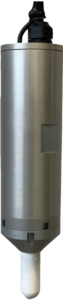
Table of Contents
Precautions
The Hortau Nitrate Probe (SNH) incorporates several electronic and optical components as well as a breakable ceramic. It must be handled with care.
Important when unpacking
Always grasp and manipulate the probe by its body
Never hold, suspend, or pull the probe by the communication cable
Do not remove the probe from the ground by pulling on the communication cable
Avoiding physical shocks
Avoid touching the ceramic tips with your hands
Do not expose to frost or temperatures above 50°C
Do not leave the sensor exposed to sunlight or in a vehicle where the temperature may be higher than 50°C
Features and specifications
The SNH is specifically designed for agricultural applications in permanent installations for the duration of a full season of field cultivation or in cover crops.
The probe measures the following parameters:
Nitrates: Provides a complete profile of the evolution of the season to adjust fertilization (N) according to the actual availability of fertilization in the soil
Salinity: Allows you to estimate more complete fertility and the risks of nuisance or toxicity due to salt accumulations
soil tension: Indicates water availability and allows irrigation to be controlled like a standard tensiometer
Temperature: Allows you to observe soil warming in the spring for seedlings and to document extremes for sensitive crops
Parameter | Measuring range | Units |
|---|---|---|
N-NO3 | 0 – 300 | ppm (mg/L) |
Salinity by electrical conductivity (EC) | 0 – 16 | dS/m |
Soil tension | 0 – 80 | kPa |
Temperature | 5 – 50 | °C |
Description of the technology
SNH technology makes it possible to measure nitrate concentrations directly in the soil autonomously, continuously and in real time. This patented technology is based on the method of absorbing UV rays by nitrates.
The probe samples water from the soil through a porous ceramic, allowing soluble nitrates to migrate to the inside of the ceramic chamber. A fraction of this solution is then pumped to the optical chamber for analysis.
The proper functioning of the probe requires a sufficient water content in the soil. An environment that is too dry can lead to drainage followed by complete drying of the ceramic chamber, making measurements temporarily impossible. However, measures can be resumed as soon as adequate water supply has restored favourable water conditions in the soil.
The technologies used for each of the parameters measured are as follows:
Nitrates: Measurement by the optical method of UV absorption with interference compensation using 2 distinct wavelengths
Salinity: Measurement of conductivity by direct contact in soil water between submerged electrodes: Measurement of the tension inside the ceramic by a pressure sensor according to the same principle as a conventional tensiometer
Temperature: Measurement by a digital temperature sensor in the probe body
Access to the Hortau app
Install the Hortau app on your computer, tablet or laptop. Your Hortau representative will provide instructions specific to your setup.
Web Application: https://app.hortau.com/
Application mobile
Initialization (first installation or start of season)
Step 1: Carefully remove the sensor from its packaging
Step 2: Plug the probe into an ST Gen6 device plugged into a wall outlet or with a fully charged battery
Note: The SNH is only compatible with Hortau G6 devices
Step 3 : In the case of a first installation or if the probe has been plugged into a different port: Connect to the device with Bluetooth and perform a SCAN using the Hortau Bluetooth tool (Hortau App => Menu => Devices => Bluetooth (symbol) => Device selection => Scan)
Step 4 : Gradually immerse the ceramic of the probe in a container filled with water. Do not submerge the entire probe, only the ceramic. Tap water can be used but contains basic salinity and could also contain nitrates, for this reason we recommend demineralized water.
The ceramic must be completely submerged
Step 5 : From the Hortau mobile app, click on the “Fill” button in the Nitrate module. This action will perform a probe fill, gas purge, and initial parameter measurement. Filling takes 30 minutes to complete
After about 30 minutes after filling, the SNH will report its first values.
Settings | Expected values |
|---|---|
Nitrate and salinity | 0 to 1 |
Tension | -0.25 to 0.5 |
Temperature | Room temperature |
Note: If you are using tap water, it is likely that the salinity and nitrates will be greater than 0 and the soil tension will vary depending on the height of water put above the center of the ceramic in step 5.
Installation
The SNH once initialized is ready to be installed.
Materials required:
SNH
ST Gen6 device and suitable stand for cultivation provided by Hortau
Mobile phone with Hortau mobile app installed and activated
3-inch diameter auger and/or garden shovel
Tools or accessories as appropriate (pliers, fastening straps (T-rap), etc.)
A felt-tip pen
A tape measure
2 liters of clean water
Installation steps:
Identify a representative location of the selected field according to the chosen objective
Install the ST Gen6 station by positioning the solar panel facing south
It is suggested to install the SNH to locate the ceramic at the depth of the most important root mass of the crop and in the center
Make a hole to the depth chosen according to the crop
Insert the sensor into the hole and pack the soil around the sensor all along its body
Remove the sensor gently using the body and not the cable
Fill the water hole and wait for the level to drop by at least half
The duration can vary depending on the type of soil and its compaction
Gently reinsert the probe into the hole to the desired depth, pressing the cover firmly as needed, but without creating lateral pressure that could break the ceramic
In the case of a shallow soil installation:
The SNH can be inserted into the soil vertically or inclined to an angle of about 30° from the ground if the target measurement depth is small, or for installations in pots or various containers of substrates in sheltered crops
Do not install the probe horizontally
The top of the probe can remain exposed off the ground without affecting the measurements, but the probe must be buried enough to be stable
The depth for good stability will vary depending on the structure and texture of the floor, in the judgment of the installer
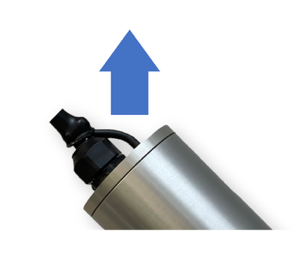
If the probe is tilted, make sure that the drain hose connected to the top of the cover is positioned upwards as shown in the arrow in the following image:
Re-compacting the soil around the probe
Activate an “auto-fill” using the button in the Hortau app
It will take a few hours (about 4 hours) for the probe to balance with the nitrate concentration in the soil
Basic Operation
Once switched on, the SNH operates fully autonomously.
Default playback settings
Settings | Measurement interval (minutes) |
|---|---|
Nitrate | 60 |
Tension, salinity and temperature | 15 |
Access to data
The Nitrate module in the Hortau app allows you to view your data in real time
The CSV Export tool in the settings section of the Hortau web version app allows you to export SNH data.
Troubleshooting
Behaviour of SNH under dry soil conditions
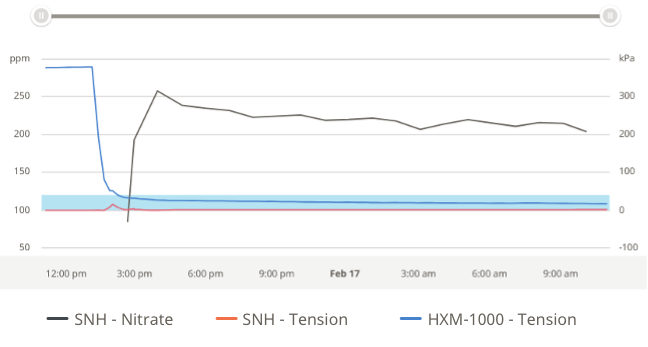
When the soil dries out and the soil tension reaches high values (≥ 80 kPa), several phenomena can be observed on the data:
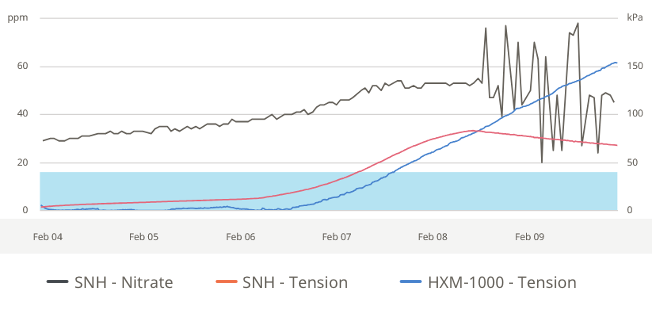
Nitrate measurements (black curve) show abrupt and unstable variations
The ground soil tension measured by the SNH (red curve) gradually decreases above 80 kPa, indicating that the ceramic chamber of the probe is being emptied (see Figure 1)
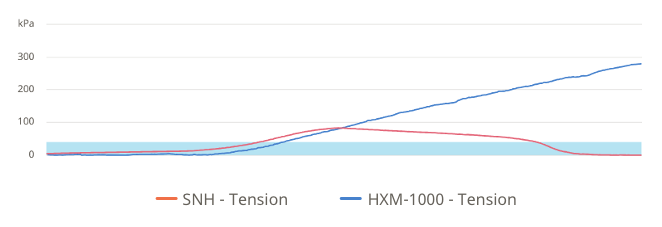
If the soil continues to dry out, the soil tension measured by the SNH continues to decrease until it reaches 0 kPa, which corresponds to complete drying of the chamber (see Figure 2)
At this stage, the soil tension measured by a tensiometer HXM1000 (blue curve) remains high and reflects the actual soil condition more accurately, with values significantly higher than those reported by the SNH
These observations indicate that in water conditions that are too dry, the SNH can no longer provide reliable readings until its measuring chamber is properly filled.
Return to Service Procedures – Dry Soil
Case of an SNH being emptied
After rain or irrigation, when the soil tension measured by the SNH drops below 10 kPa, it is recommended to carry out a filling pumping using the button provided for this purpose in the Hortau app.
In most types of soils, a soil tension of less than 3 kPa is ideal for efficient filling
It is possible to perform filling at higher soil tensions, but the filling efficiency can then be reduced, which can affect the stability of the measurements in the long term
Case of a completely empty SNH
If the SNH is completely empty, a HXM1000 soil tension monitor can be used as a reference to guide the timing of filling:
When the soil tension measured by the HXM1000 decreases to about 25 kPa or less, the conditions are usually adequate to fill the SNH
After filling, a slight increase in soil tension measured by SNH can be observed. This is normal and confirms that the pump is working properly.
Cases of lack of rain or irrigation
When neither rain nor irrigation is available, it is recommended that the probe installation protocol described in Section 6 be applied:
Remove SNH from the ground
Fill the installation hole with water
Wait for the water level to drop at least 5 cm (2 inches)
Reinstall the probe
Autofill
Alternative without probe removal
If you do not want to remove the SNH from the ground:
Make a bowl in the ground around the top of the probe to trap water
Apply 1 to 2 L of water as evenly as possible all around the probe
The volume of water can vary depending on the type of soil as well as the state of drying
Wait for sufficient time to allow water to infiltrate and restore water conditions suitable for filling (25 kPa or less)
Then proceed to self-fill
Note: In this case, the time before self-filling is usually longer than when the sensor is removed and reinstalled. Environmental conditions can vary and affect the filling efficiency of the probe. If the filling is not successful, repeat the previous steps.
Stabilization after filling
Following filling, a water balance is usually established within a few hours. However, this period may vary depending on:
Soil water conditions
Soil type
The distribution of water around the probe
Validation of the proper functioning of the SNH after installation
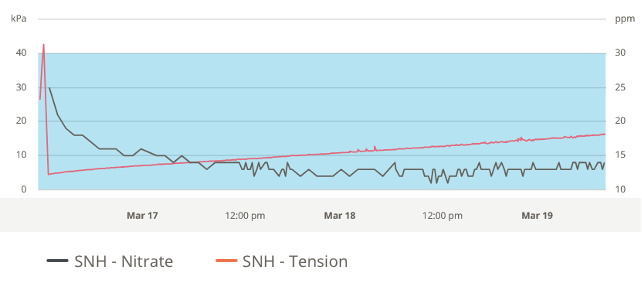
Following the installation of the probe and the execution of a pump, a slight increase in the soil tension measured by the SNH is usually observed. This variation confirms the proper functioning of the pump and the adequate filling of the ceramic chamber.
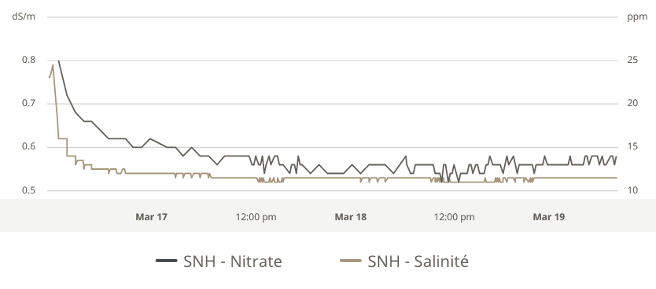
Subsequently, the nitrate concentrations measured by the probe gradually balance out. This stabilization phase usually takes place within a few hours, depending on:
The water conditions of the soil,
The physical and chemical properties of the soil.
A similar behaviour is observed for the salinity of the soil solution, which also reaches an equilibrium state in the same way as nitrates.
As long as this balancing phase is ongoing, slight variations in the measured parameters are normal and confirm the correct operation.
Lack of Data – Diagnosis and Corrective Actions
Cases where no data is transmitted (soil tension, salinity, temperature, nitrates)
If the device does not transmit any data (soil tension, salinity, temperature or nitrates), perform the following checks:
Check that the SNH probe cable is properly connected to the device.
Confirm that the power supply to the appliance is functional.
Check that the device’s cellular communication is operational (signal and data transmission).
If, after these checks, no data is transmitted, contact Hortau Technical Support.
Case of a completely empty SNH
If the SNH is completely empty, a HXM1000 soil tension monitor can be used as a reference to guide the timing of filling:
When the soil tension measured by the HXM1000 decreases to about 25 kPa or less, the conditions are usually adequate to fill the SNH
After filling, a slight increase in soil tension measured by SNH can be observed. This is normal and confirms that the pump is working properly.
Cases where all data are transmitted, except nitrates
If the device correctly transmits soil tension, salinity and temperature data, but no nitrate data, the possible causes are as follows:
The probe is empty or in the process of being emptied, usually due to overly dry ground conditions.
The probe requires calibration.
In these situations, please contact Hortau Technical Support for appropriate assistance before proceeding with operations.
Storage (end of season) and maintenance
It is important to remove the SNH and its device from the field or other facilities before there is any risk of frost in the ground.
Remove the soil around the top of the sensor if it is completely or almost completely buried.
Never pull the probe by its wire and carefully remove it from the ground.
Store/protect the SNH in a manner that prevents shock or freezing during transport to the storage area.
Clean the body and ceramic of the SNH with water and a brush as needed.
If the probe has been disconnected from the device, it is best to reconnect it in the same port that was previously used.
If it’s another port you will have to scan again
Prepare and perform an internal sensor wash
Immerse the probe in a container of clean water so that the ceramic is completely submerged.
Using the mobile app, at the bottom of the Nitrate module, press the “Fill” button
As duration, enter 24 hours.
After 24 h, remove the SNH from the water and let it dry for a few days
Store the SNH and its device in a dry and heated place and away from any risk of shocks.
Contact us
Department | Name | Contact Information |
|---|---|---|
Customer Service | Laurence Bouchard | Office: (418) 836-7927, 0 email: [email protected] |
Sales | Caroline Letendre | |
Technical Service | Emmy Le Bihan | |
Agronomic Service | Francis Desaulniers | Cell. : (514) 793-4779 email : [email protected] |